
CodeTwo Public Folders5.0 - Download
You'll be able to download in few seconds.
Publisher Description
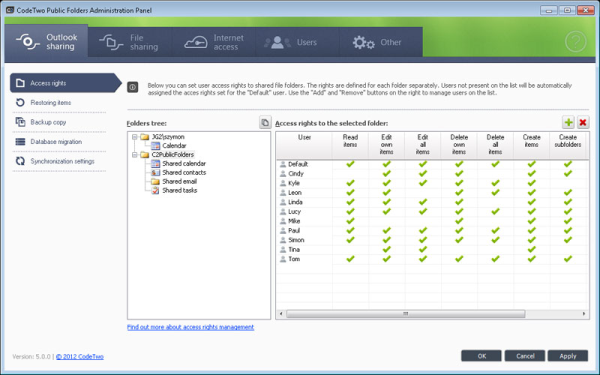
CodeTwo Public Folders turns your Microsoft Outlook into a real work-group tool. Using it, you can easily share Outlook calendar, contacts, email, tasks and even Office docs with others. All data can be synchronized in local network or over the Internet. What is more, you get all this without the need to buy the expensive and complicated Exchange Server or insecure Cloud accounts.
CodeTwo Public Folders lets you share personal folders and create public folders in Outlook, where many users can publish and share their data in the network and work on it simultaneously. It's a perfect tool for managers!
The application synchronizes data between multiple Outlook clients in a local network. The synchronization is performed in the background, automatically and in real-time.
With CodeTwo Public Folders you can:
- sync calendars, contacts, e-mail, tasks, etc. with others,
- plan meetings,
- keep a common address book and contact base,
- share personal folders between many PCs,
- create message boards and discussion groups,
- share documents and files of any type,
- manage access rights to shared folders,
- work with shared folders in offline mode - it mimics Exchange Server!
CodeTwo Public Folders taps into Microsoft Outlook sharing capabilities; so you do not need to learn new software. The work involved in sharing data is just the same as in working with one's personal folders in Outlook. Users can immediately start using Outlook for group work without wasting time for learning a new interface.
Once CodeTwo Public Folders is installed, a new tree of public folders appears in Outlook. Users can create, edit and delete folders and items of any type (email, contacts, calendars, tasks and documents). Changes made by one user are immediately synchronized in real-time and are made visible for the rest of users on other computers in your network, which allows real teamwork. The program works also with Outlook 2010 x64.
About CodeTwo Public Folders
This Office Suites & Tools program is available in English. It was last updated on 29 September, 2026. CodeTwo Public Folders is compatible with the following operating systems: Windows.
The company that develops CodeTwo Public Folders is CodeTwo. The latest version released by its developer is 5.0.
The download we have available for CodeTwo Public Folders has a file size of 75.5 MB. Just click the green Download button above to start the downloading process. The program is listed on our website since 2012-09-27 and was downloaded 0 times. We have already checked if the download link is safe, however for your own protection we recommend that you scan the downloaded software with your antivirus. Your antivirus may detect the CodeTwo Public Folders as malware if the download link is broken.
How to install CodeTwo Public Folders on your Windows device:
- Click on the Download button on our website. This will start the download from the website of the developer.
- Once the CodeTwo Public Folders is downloaded click on it to start the setup process (assuming you are on a desktop computer).
- When the installation is finished you should be able to see and run the program.
Program Details
System requirements
Download information
Pricing
Version History
version 5.0
posted on 2012-09-27
Version 5.0 includes major improvements, e.g. Internet synchronization, security enhancements, new file sharing option (the built-in File Sharing App) and licensing change. The program gained the feature of sharing Outlook and non-Outlook files across the Internet, but without using the Cloud.
version 4.1
posted on 2008-06-17
Eigene Symbolleiste in Outlook; Synchronisation von gelesen/ungelesen-Informationen, Beschleunigung der Datensynchronisation; Kompatibilität mit Windows Vista;
Disclaimer
External Download
We do not host CodeTwo Public Folders on our servers. We did not scan it for viruses, adware, spyware or other type of malware. This app is hosted by the software publisher and passed their terms and conditions to be listed there. We recommend caution when installing it.
The external download link for CodeTwo Public Folders is provided to you by apps112.com without any warranties, representations or guarantees of any kind, so access it at your own risk.
If you have questions regarding this particular app contact the publisher directly. For questions about the functionalities of apps112.com contact us.
